Easter Dots: A Bubbly Color Font for Vibrant Designs
More Than Just Letters
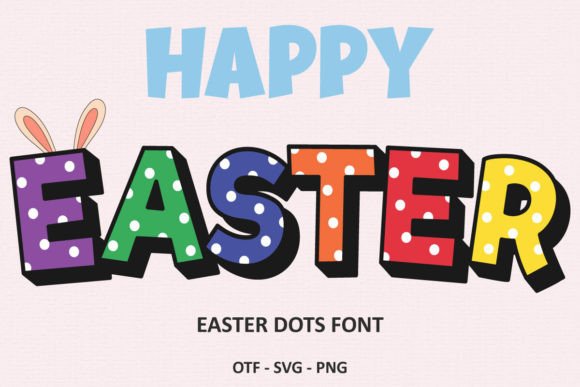
When a design project calls for a genuine burst of energy, standard typography often falls short. You need something with personality, something that immediately communicates joy and playfulness. This is where a unique display font like Easter Dots comes into play. It’s not just a typeface; it’s a complete visual element. As a six-color font, each character is a small, cohesive graphic composed of vibrant, layered dots, creating a chic and bubbly aesthetic that standard black-and-white fonts simply can't replicate. This isn't about applying a color overlay later; the color is integral to the font's DNA, ensuring consistency and a polished look right out of the box.
The appeal of Easter Dots lies in its unapologetic fun. It’s a creative font designed to be the center of attention. Its rounded forms and multi-hued construction give it a friendly, approachable, and modern feel. Think of it as a visual exclamation point. While a classic serif font might whisper tradition and a clean sans serif font might speak with corporate clarity, Easter Dots shouts with joy. It’s a premium font that acts as a design asset, capable of defining the entire mood of a project in an instant.
Where This Playful Typeface Truly Shines
Understanding a font's personality is one thing; knowing where to deploy it is what separates good design from great design. Easter Dots is a specialist, not a generalist. You wouldn't use it for body text in a novel, but for projects where grabbing attention is the primary goal, it's an invaluable tool. Its strengths are most apparent in applications where visual impact is paramount.
Consider these practical applications where this color font can elevate your work:
- Branding and Logo Design: For brands targeting a younger, family-friendly, or celebratory market, Easter Dots is a fantastic choice for a logotype. It instantly communicates a sense of fun and creativity, making it perfect for bakeries, party supply stores, children's clothing lines, or creative agencies that want to project a playful brand identity.
- Marketing and Social Media: In the endless scroll of a social media feed, you have milliseconds to make an impression. Use Easter Dots for headlines on Instagram posts, Facebook ads, or Pinterest graphics to stop the scroll. It’s particularly effective for holiday promotions, event announcements, and sale graphics where a cheerful, urgent tone is needed.
- Publishing and Editorial Design: A magazine cover, a chapter title in a children's book, or a feature headline in a digital publication can all benefit from this display font. It adds a layer of visual interest and sets a specific, energetic tone that draws readers in. It works beautifully for short, impactful statements in editorial design.
- Packaging Design: Imagine this font on a box of colorful candies, a bag of gourmet popcorn, or a line of fun, scented soaps. It helps the product stand out on the shelf and conveys a sense of quality and playfulness before the customer even interacts with the product itself.
- Personal Projects and Crafting: For personal invitations, birthday cards, or scrapbooking, Easter Dots adds a professional yet whimsical touch. The black version of the font is compatible with cutting machines like Cricut, making it a versatile choice for crafters who want to create custom vinyl decals, t-shirts, and other physical goods.
Using Easter Dots Effectively: A Practical Guide
Integrating a bold color font like Easter Dots into your workflow requires a bit of strategy. Its power lies in its ability to create a strong focal point, so it’s best used with intention. Here’s how to get the most out of this unique typeface.
Pairing for Balance and Hierarchy
Because Easter Dots is so visually loud, it demands a quieter partner. The key to a successful font pairing is contrast. Pair it with a simple, neutral sans serif font for subheadings or body text. Fonts like Lato, Open Sans, or Montserrat provide a clean, readable foundation that allows the headlines set in Easter Dots to pop without overwhelming the viewer. Avoid pairing it with other decorative, script font, or handwritten font styles, as this will create visual chaos and harm readability. The goal is to let Easter Dots be the star of the show.
Readability and Application
This typeface is designed for headlines and short phrases. Its dotted construction, while charming, can reduce legibility at smaller sizes or in long blocks of text. Always use it for display purposes: large headlines, single words, or short, punchy statements. Test it at the intended size to ensure every letter is clear. For digital applications, its vibrant colors make it ideal for web design banners and hero images, while its high-energy style is perfect for social media graphics.
Understanding File Formats and Compatibility
It's crucial to understand the technical specifications of this commercial font to avoid frustration. Easter Dots is provided in multiple versions for different use cases:
- Color Version (OTF/TTF): This is the full, vibrant, six-color version. It is compatible with professional design software that supports color fonts, such as Adobe Photoshop, Adobe Illustrator, and Silhouette Studio. It also works in the free vector editor Inkscape. Use this version for all your digital and print design projects to get the full effect.
- Black Version (OTF/TTF): This is a standard single-color version of the font. This version is fully compatible with a wider range of software, including Cricut Design Space and other cutting machine programs. Use this for physical crafting projects where you need a solid shape to cut from vinyl or cardstock.
By understanding these distinctions, you can choose the right file for your project, ensuring a smooth creative process. As with any premium font, be sure to review the commercial license to ensure it covers your intended use, whether for a personal blog or a client's product packaging design